I kind of overengineered my résumé
by Andy Zeigert
4 min read
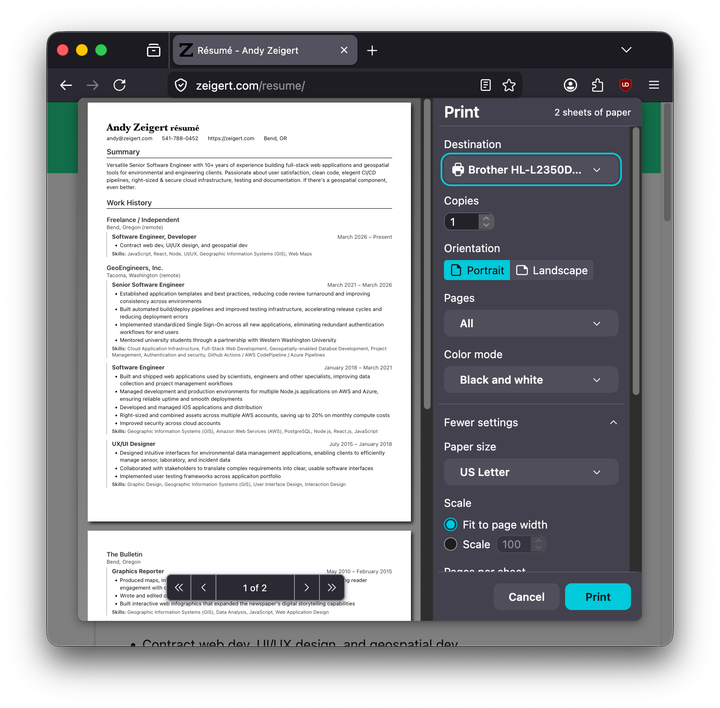
I've been working on my résumé lately. I attended a webinar offered by a career advisor firm that I connected with, and I learned a little about how job seeking has changed since I last did it. Some highlights:
- Cover letters are rarely expected now (cool!)
- Every résumé you send out needs to be customized (less cool!)
- LinkedIn is the center of the jobseeker's universe
A custom résumé for each job application?! Mostly this involves providing a professional summary statement at the top and filling the whole thing with keywords lifted directly from each respective job description.
A long job search could mean dozens of applications, if not more. The idea of keeping dozens of Word or Pages documents organized, each a slightly-tweaked revision of some Ur-résumé, gave me a slight headache.
Not to mention LinkedIn expects you to input and maintain all of this data on their site as well, so you end up with yet another copy.
What I really wanted was a single source of truth, and I wanted to do it the POSSE way. This site is built using Lume, a lovely little static site generator for Deno. I wanted:
- A single source of truth for my work history and education, on my own site
- The ability to create variants of that for job applications
- Print/PDF from the browser
- JSON Resume integration
- Update LinkedIn programmatically
I was able to accomplish everything except the last one. However, I have a partial workaround.
Source of Truth
I originally kept my work history and education details as Markdown in a resume.md file. Lume would then generate an HTML version. Easy.
But my new version would require a little more structure. I consolidated all of my info into src/_data/resume.yml file. Here's a snippet:
basics:
  name: Andy Zeigert
  label: Senior Software Engineer, UI/UX Designer, Geospatial Engineer, Cloud Infrastructure Engineer, Project Management
  email: andy@zeigert.com
  phone: "541-788-0452"
  url: https://zeigert.com
  location:
    city: Bend
    region: OR
    countryCode: US
  profiles:
    - network: Mastodon
      url: https://mastodon.social/@zeigert
    - network: GitHub
      username: ajzeigert
      url: https://github.com/ajzeigert
    - network: LinkedIn
      username: andy-zeigert
      url: https://linkedin.com/in/andy-zeigert

summary: >-
  Versatile Senior Software Engineer with 10+ years of experience building
  full-stack web applications and geospatial tools for environmental and
  engineering clients. Passionate about user satisfaction, clean code, elegent CI/CD pipelines, right-sized & secure cloud infrastructure, testing and documentation. If there's a geospatial component, even better.

work:
  - company: Freelance / Independent
    location: Bend, Oregon (remote)
    positions:
      - title: Software Engineer, Developer
        startDate: 2026-03
        highlights:
          - Contract web dev, UI/UX design, and geospatial dev
        skills:
          - JavaScript
          - React
          - Node
          - UI/UX
          - Geographic Information Systems (GIS)
          - Web Maps
Lume makes the contents of this file available as a variable from anywhere. A layout document, src/_includes/layouts/resume.vto, does just this. This layout is a Vento template. The original resume.md now simply references the template, which uses the resume variable to build the HTML.
Print or PDF
I used @media print css properties to format the content of the page for printing nicely on a letter size sheet. As easy as File => Print.
Add the JSON Resume page
The Resume JSON is generated by src/resume.json.page.js, which essentially translates the original yaml data into JSON. It's linked to at the bottom of the resume page, and can be used in a variety of applications.
Variants
I can use the Lume archetype system to create variant versions of my résumé:
deno task lume new resume-variant
This creates a new yaml file in src/resume-variants/, which is parsed by src/resume-variants.page.js and merged with the main resume details. Several overrides are available, allowing me to customize the summary statement, add keywords, replace highlights and exclude entire sections. All variants can be accessed at /resume/<variant-slug>. The original /resume/ endpoint remains the same.
Syndication
I was unable to automatically push changes to LinkedIn because, although LinkedIn does have an API, it does not support making changes to the specific fields necessary to a completely automatic update.
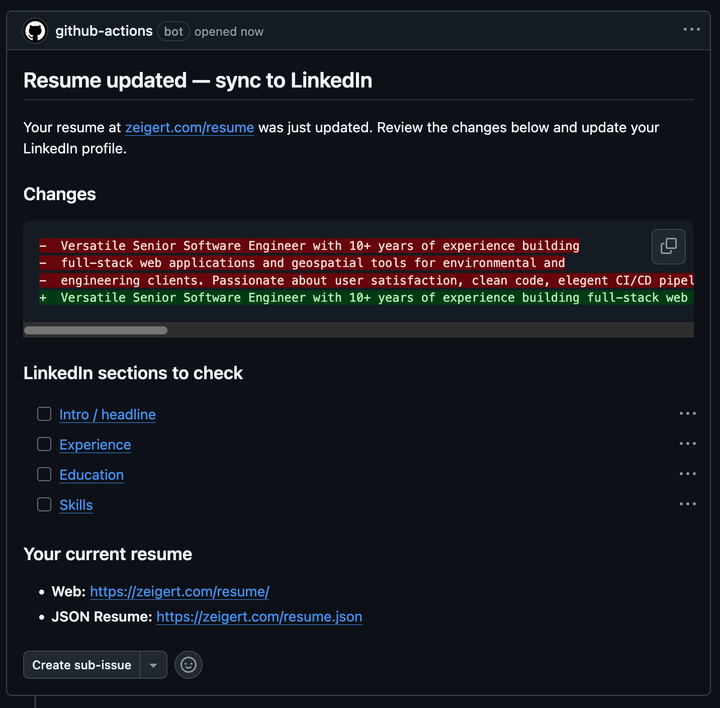
In fact, it seems the ONLY way to update your work and education history on LinkedIn is by logging into their web portal and making the changes manually. It's not great, but I could still partially automate the process using some reminders. A Github Action now checks the diff on src/_data/resume.yml and creates an issue in the repository with the changes and a checklist of places on my LinkedIn profile to check. It looks like this:
Conclusion
Although I wasn't able to complete the final goal exactly how I'd hoped, I did accomplish everything else. I can now keep the source of truth for my résumé on my own site and syndicate it everywhere, even if there is still a manual step for now. Maybe I'll work on a complex Puppeteer script to further automate it.
Check out my résumé here: /resume/
Here's an example variant: /resume/acme-corp
The source code for this site is here: https://github.com/ajzeigert/zeigert.com